




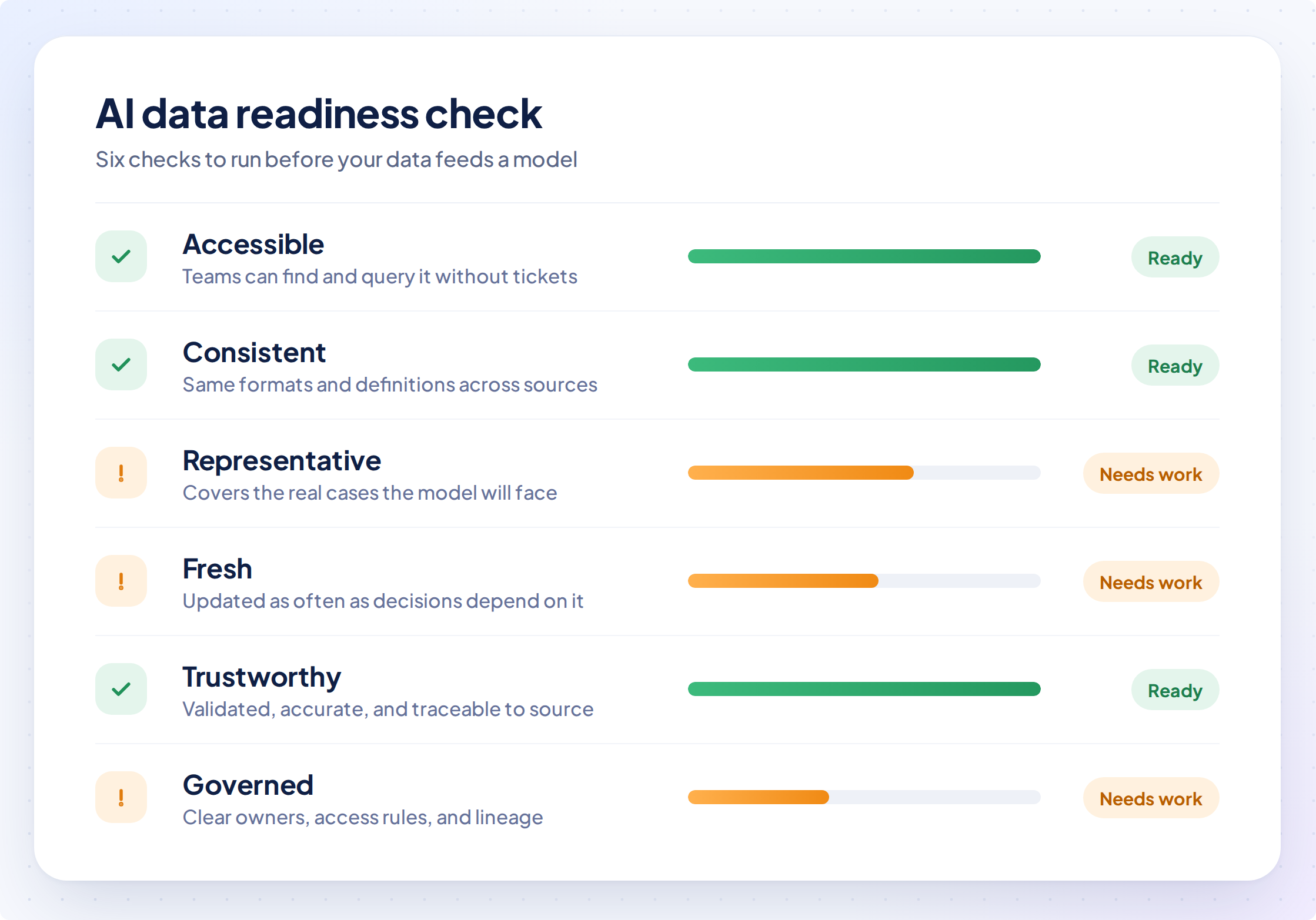
Most AI conversations I have with leaders start with the tool or the model. I start with the data. Is your data in a state where AI can actually use it? Can you trust the data, and the decisions your systems make based on it? Here are six checks that answer it, and you can run all of them this week.
Unready data is expensive. Gartner has predicted that through 2026 organizations will abandon 60% of AI projects that aren’t supported by AI ready data. In the same research, 63% of organizations said they either lack the right data management practices for AI or aren’t sure they have them. Abandoned projects mean budget spent with nothing in production, and the second number worries us most, because you can’t fix what you can’t measure.
That’s why we define “ready” as something you can test. This article gives you six checks, a way to score them and the engineering work that closes the gaps. If you’d rather not do the work alone, our data engineering services cover exactly this.
What does AI ready data actually mean?
AI ready data is data you can prove is accessible, consistent, representative, fresh, trustworthy and governed for one specific use case. Each of those words is a test, and we walk through all six below.
How is AI ready data different from BI ready data?
Data that works for dashboards often fails for AI, because the two need opposite things. A dashboard needs summaries and tidy numbers. A model learns from detail, including the odd cases and the gaps, because that’s what real life looks like. Gartner describes AI ready data as data that represents the use case, with its patterns, errors and outliers. Handing a model data that was cleaned for a dashboard hides exactly what it needs to learn from.
- Detail: AI often needs event level records, such as one row per sale or ticket.
- Outliers: AI needs them kept and flagged.
- Gaps: AI needs them left visible so patterns can be learned.
- Labels: models that learn from examples need labelled records.
The cost shows up late. A model trained on dashboard data looks fine in testing and then fails on the cases that matter most.
Why isn’t traditional data management enough?
Traditional data management is too slow, too structured, and too rigid for AI teams, according to Gartner. Leaders can’t rely only on formal data management practices if they want AI inside their data and analytics strategy. Uses of data go undocumented, data sits in silos across many systems and platforms, and most organizations lack the practice and the metadata (the information that says what data is, where it came from and who owns it) to judge whether it’s ready.
Each gap maps to a check below. Silos are an accessibility problem. Undocumented use and missing metadata show up as consistency and governance problems. That’s also why readiness is an ongoing practice that continues after the first project ships.
Why does readiness belong to one use case?
Data is rarely AI ready across a whole company at once, so judge readiness one use case at a time. Customer data can be ready for a support assistant and completely unready for a pricing agent. Name the use case first, list the data it needs and run every test below against that list.
Naming it also keeps data requests honest. Requests for data often grow beyond what a use case needs, which delays the pilot. Ask whoever builds the model how much data the use case really needs, and confirm the answer before you start collecting.
How do you test whether your data is ready for AI?
Start with six practical checks you can perform this week. Data engineering provides the foundation through five jobs: identify the source systems, ingest data from them, store the raw data in a lakehouse or warehouse, transform it by cleaning, matching, deduplicating and applying business rules, and serve it to dashboards, applications and AI agents. Across all five jobs, teams must also manage scheduling, retries, alerts, schema changes and pipeline maintenance. Quality checks at every handoff help catch problems early, before unreliable data reaches a dashboard or AI application.
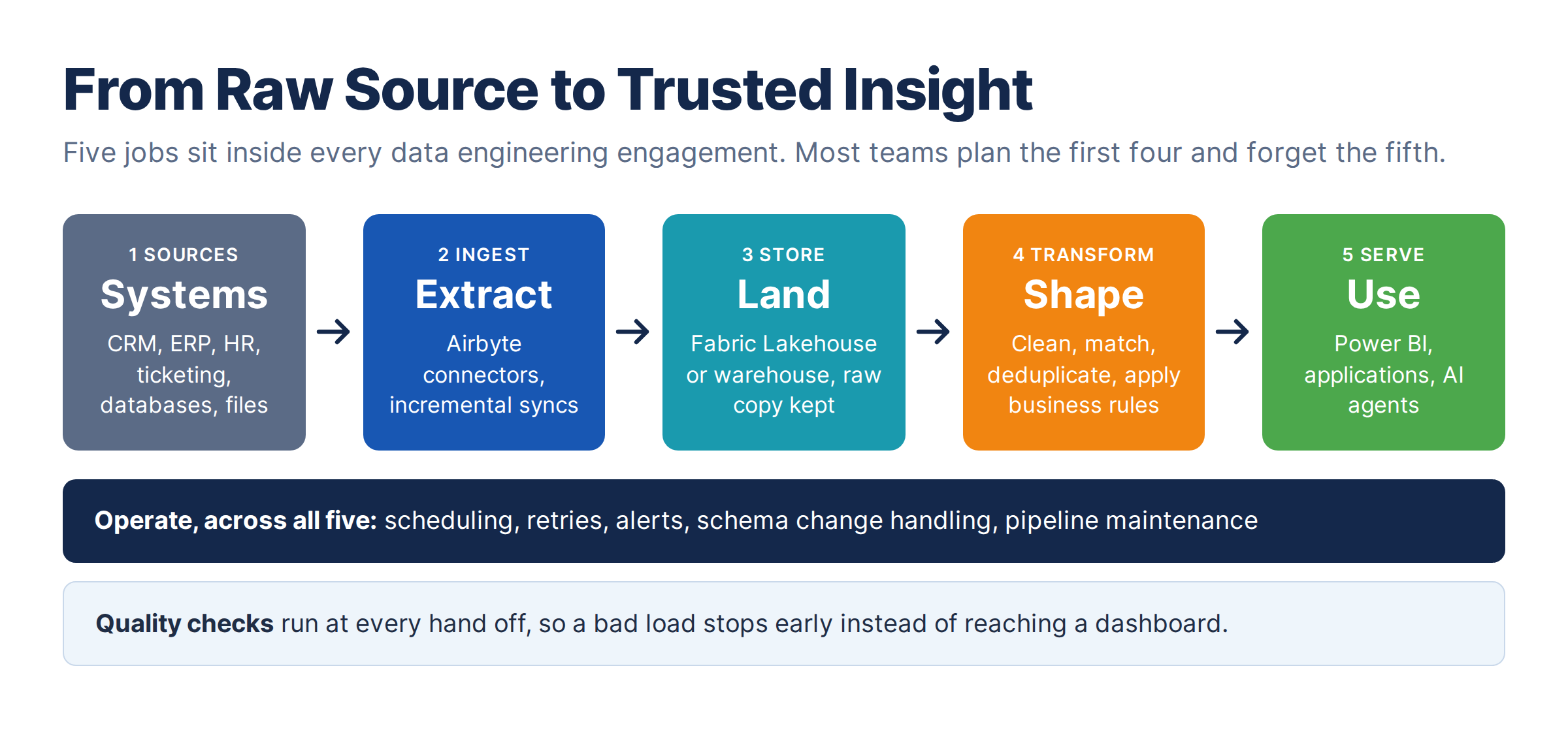
Operate is the job teams forget. Sources add columns, suppliers change formats and a field gets renamed without notice, so a dataset that passed in March can quietly fail in June.
Accessible: does the data arrive without manual steps?
Data is accessible when every source the AI needs lands automatically on a schedule. It’s common for one customer to sit in several systems under different IDs. A file that someone exports and fixes in Excel every Monday is a manual step, and when that person is on leave the AI runs on stale data. Ingestion tools such as Airbyte, which offers prebuilt connectors for many sources, make this quick, but a few settings decide whether it holds up.
- Sync mode: use incremental with deduplication (new or changed rows only, latest version kept) for most tables, and full refresh for small reference tables.
- Cursor: Incremental sync needs a reliable, updated timestamp, and without one, changes get missed.
- Schema changes: decide in advance what happens when a column (a field in a table) is added or dropped. A dropped column should raise an alert.
Choose the loading pattern deliberately. ELT loads raw data first and transforms it inside the platform, for example Microsoft Fabric. ETL transforms data before it lands. Default to ELT and use ETL when a rule requires it.
- Use ELT when the platform can do the heavy transformation; you want raw data kept so logic can be rebuilt later without going back to the source, and several teams need different shapes of the same data.
- Use ETL when sensitive fields such as national IDs or salary must be masked before they land anywhere shared, when a legal rule limits what may be stored, or when the target system has little compute.
Accessible: what about documents, emails and tickets?
Unstructured data, such as contracts, emails, support tickets, and PDFs, needs a home that keeps it organized and secure. A data lake stores files cheaply but turns into a swamp without rules, and a data warehouse holds governed tables but not documents. A lakehouse holds both together as a single copy. In Microsoft Fabric, a Lakehouse has a Files area for raw material and a Tables area for structured data.
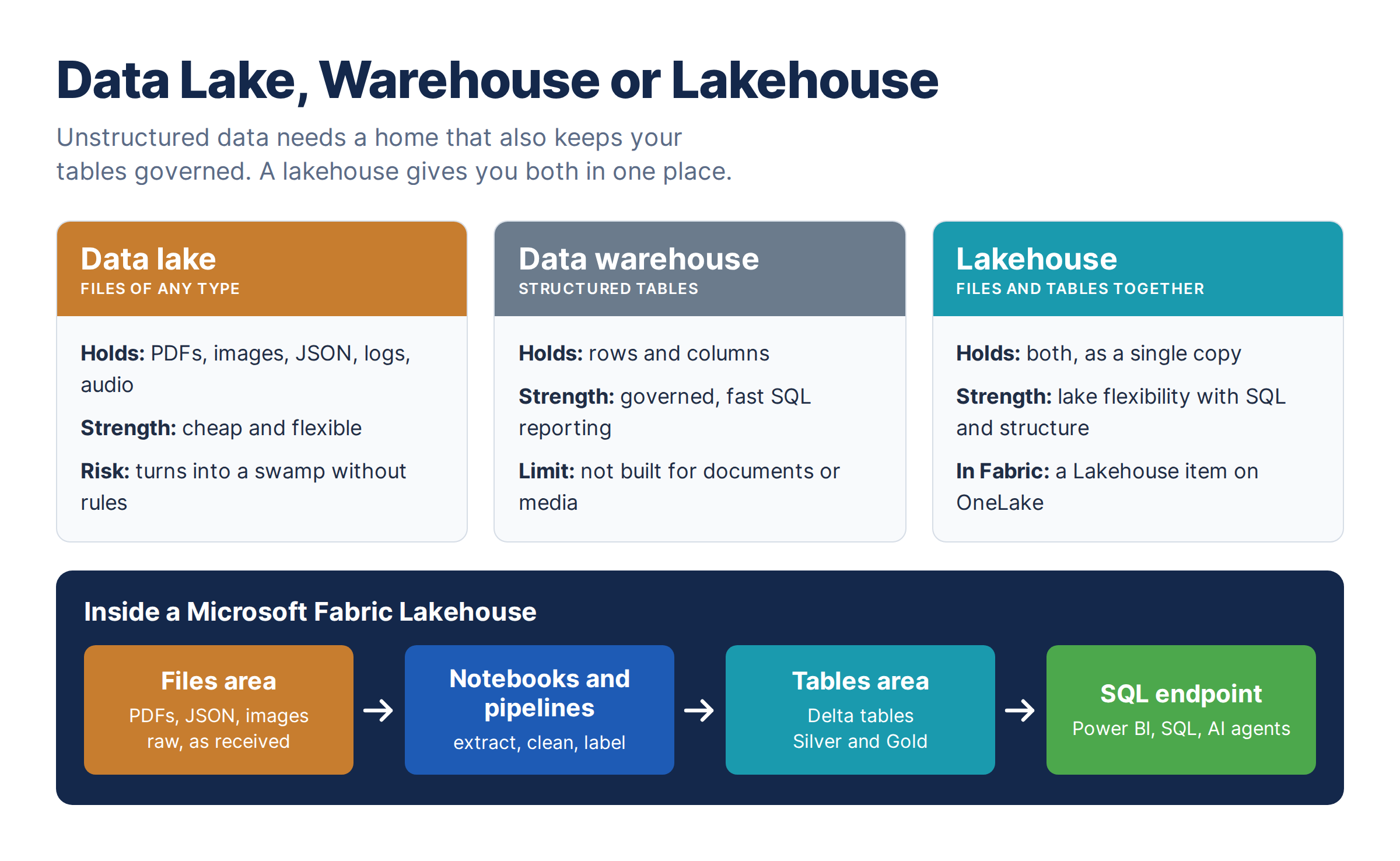
Here’s how we’d set up an assistant that answers which customers have a renewal clause expiring this quarter and what they’re complaining about.
Lakehouse: customer_knowledge

Files/
  bronze/contracts/    PDFs exactly as received
  bronze/tickets/      JSON exports from the ticketing tool

Tables/
  silver_documents          one row per file, with text and status
  silver_tickets            cleaned tickets
  gold_customer_documents   documents linked to the CRM customer
- Land: copy files into Filesexactly as received.
- Extract: a notebook pulls outthe text, writes one row per document and logs failures.
- Label: each row carries adocument id, a file hash (a fingerprint that catches duplicates), the source,type, customer id and load time.
- Link: join documents to the CRMcustomer, so one question reaches both the contract and the tickets.
If the assistant answers from documents, three more steps sit on top: splitting them into chunks, converting chunks into embeddings (numbers that capture meaning) and storing them in a vector store (a database that searches by meaning). Gartner lists these among the AI specific capabilities to add. They only work as well as the labels beneath them, and without labels the assistant can’t tell a current contract from a superseded one.
Consistent: does everyone get the same answer?
Data is consistent when two teams asking the same question get the same answer. Sales counts a customer when the contract is signed, and finance counts one when the first invoice is paid. Both reports are right, and an AI can’t know which one you meant. Names cause the same trouble: Acme Corp and ACME Corporation may be one customer in two systems, so the AI counts two.
The fix is to consolidate in layers, often called bronze, silver and gold.
- Bronze: raw data exactly as it arrived, which is your audit trail.
- Silver: cleaned data with duplicates removed and keys matched across systems. Detail and outliers stay in.
- Gold: business ready data with one definition per metric and a named owner.
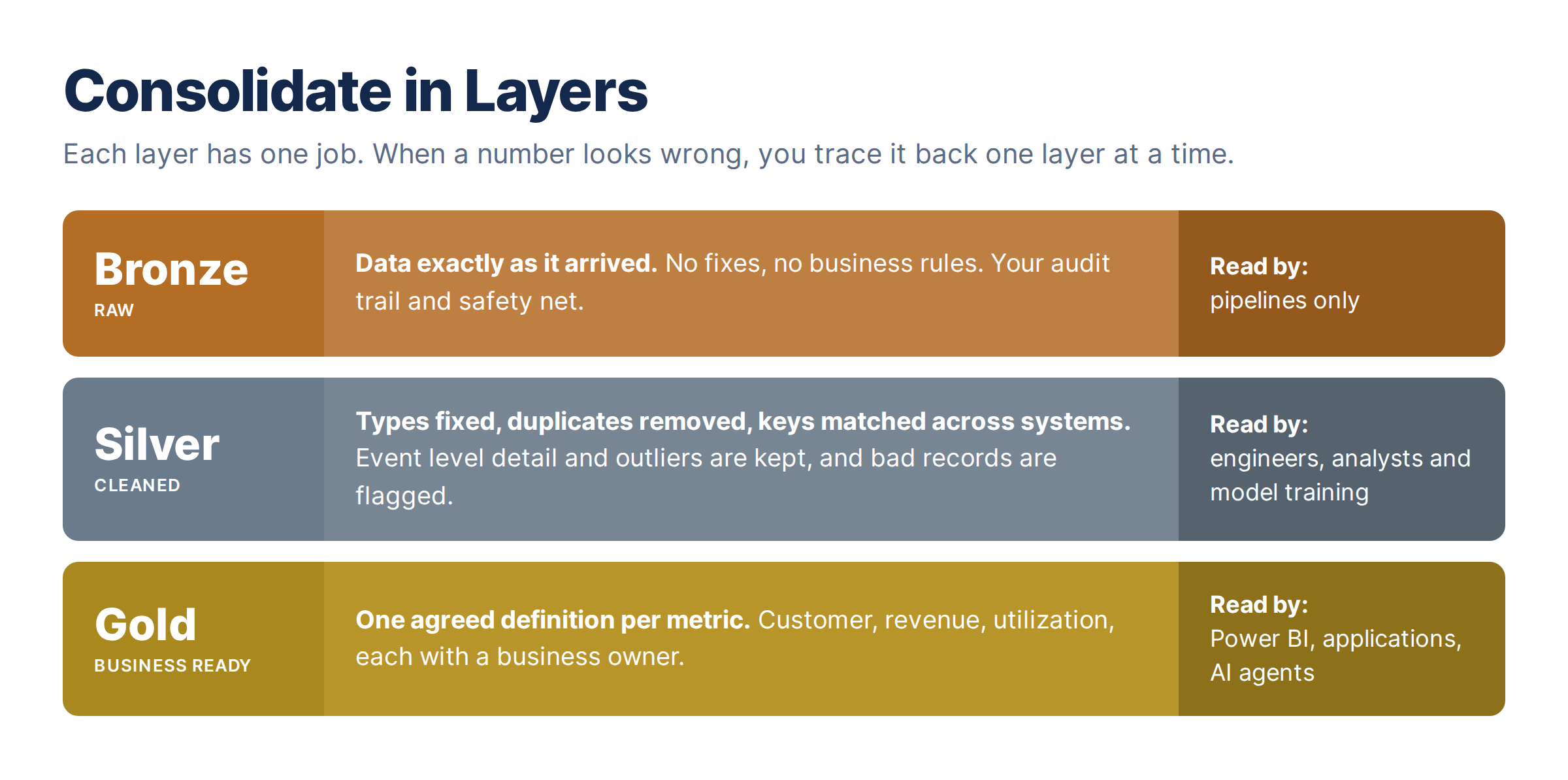
Agents that answer business questions should read Gold. Models that learn from history, such as forecasting, usually need the detail in Silver. Nothing should read Bronze. When a number looks wrong, the layers tell you where to look, which cuts the time to find the cause.
Representative: does the data include the awkward cases?
Data is representative when it includes the awkward cases the AI will meet in production. Reporting teams often fail this check without noticing, because tidy data looks healthy. A model trained on tidy data gets the messy real case wrong, usually in front of a customer.
- History: does it cover the seasons, peaks and bad months the AI will face?
- Outliers: are they kept and flagged, or were they deleted to make charts cleaner?
- Raw detail: was event level data archived or thrown away after reporting? If so, you’ll need to extract it again.
- Labels: models that learn from examples need labelled data, and labelling by domain experts can take weeks.
Try this test: list twenty real cases the AI will face, including the awkward ones, and check that each appears in the data. The missing ones are your gaps.
Fresh: how old is the data when the AI reads it?
Data is fresh when you measure its age and it stays inside a limit you’ve agreed. A nightly sync that finishes at 6 AM instead of 2 AM means the morning report runs on yesterday’s data and nobody knows. An AI agent in the same position acts on that old data, so a late load becomes a wrong decision. This query shows how old a table is.
SELECT MAX(loaded_at) AS last_load,
       DATEDIFF(minute, MAX(loaded_at), GETDATE()) AS minutes_old
FROM bronze.orders;
Expose freshness as a field next to the data, so an agent can say the data is three days old or decline to act. Also separate training data from live feeds, because a model may train on three years of history and still need a feed that’s minutes old in production. Set a limit for each.
Trustworthy: what happens when bad data arrives?
Data is trustworthy when bad data stops the pipeline and alerts a named person instead of flowing through. Each stage proves its own output before passing it on, with checks after ingest, after cleaning and before serving.
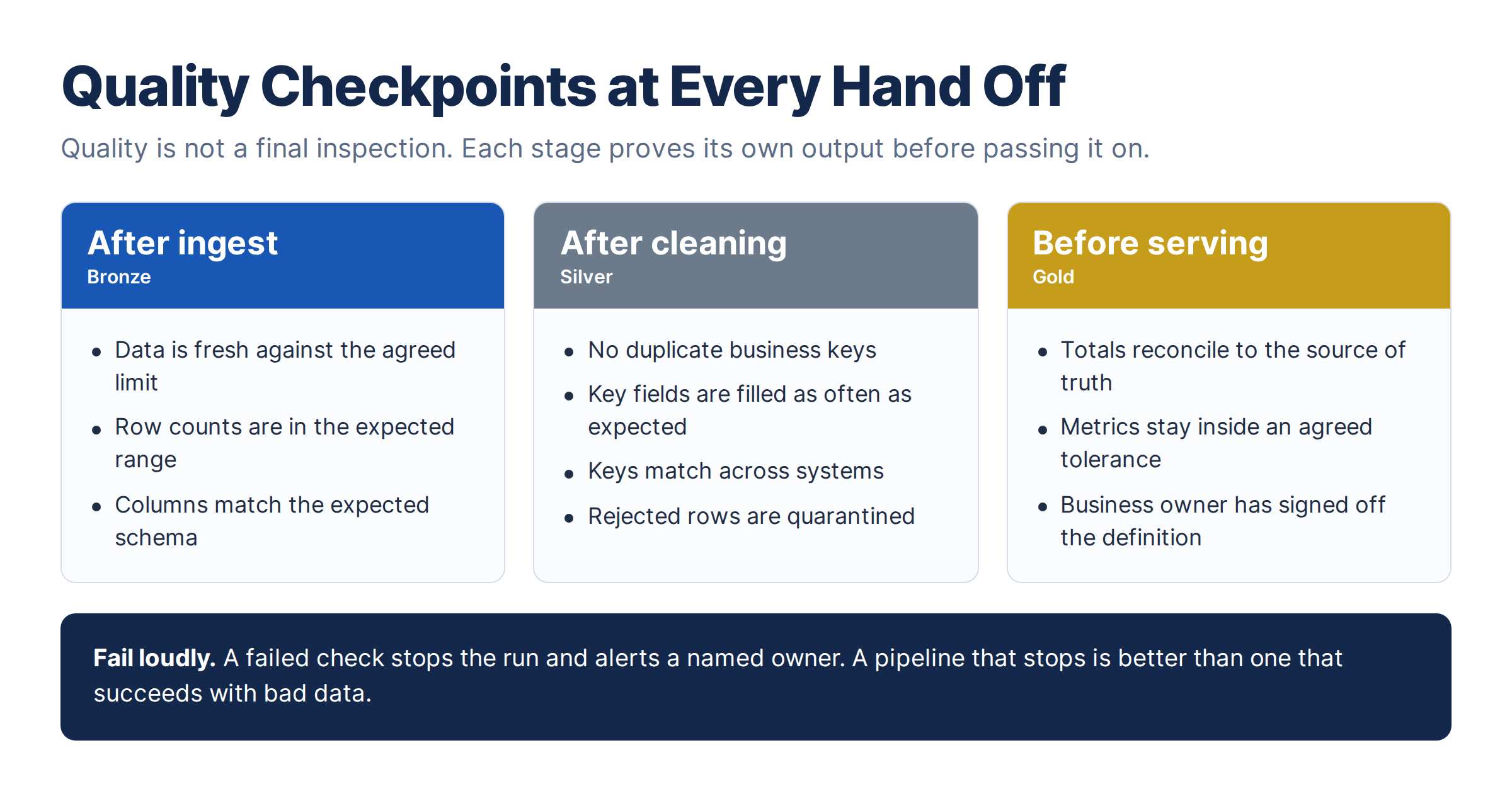
Four failures cause most of the damage.
- Silent schema changes: a source team renames a column, the pipeline keeps running and a field fills with nulls.
- Duplicates after retries: a job fails halfway, reruns and loads the same rows twice, so revenue is overstated.
- Quiet drift: a field that was 99% filled last month is 60% filled today, and the model slowly gets worse.
- Manual steps: someone fixes a file by hand every week, and the data stops when they’re away.
This query finds duplicate keys in a table.
SELECT customer_id, COUNT(*) AS copies
FROM silver.customers
GROUP BY customer_id
HAVING COUNT(*) > 1;
Wrap checks like this in the pipeline so a failure stops the run, then reconcile your totals against the source of truth. If the CRM shows 1,240 active customers and your data shows 1,198, you want to know why before your CFO asks. The industry calls this kind of continuous monitoring data observability, and Gartner lists it among the practices that keep AI data healthy.
Governed: can you prove who may see what?
Data is governed when access, consent and ownership follow it into the AI. A person usually reviews a dashboard before acting on it. An AI agent acts without that pause, so it can send the wrong email, quote the wrong price or read something the person asking should never see.
- Point agents at governed views and carry access permissions across, including for documents.
- Define what each agent may read, recommend and execute. Require human approval for high-impact actions.
- Tag sensitive columns once and let the pipeline mask them. Gartner calls this moving metadata from passive documentation to active use.
- Ask legal whether your consent terms cover AI use, and whether you can delete a person’s data and retrain.
- Set an approved purpose, retention period and deletion process for every AI dataset, including indexes, embeddings and backups.
- Keep lineage, which means knowing where every record came from, so you can prove it.
- Give every dataset a business owner who can say what a field means, and send every failure to a named person.
- Log data access, sources, actions and approvals. Monitor exceptions and define a response process for disclosure, unauthorized action or leakage.
Build a small pipeline health view in Power BI/ANYTool from the run log, showing the last successful run, freshness against the limit, failures this week and rows loaded against the usual volume. A delivery manager should be able to read it in one minute.
How do you score your results and decide when to go live?
Score each check on four levels, and don’t go live until every check clears the bar.
- Level 1, not ready: data is missing, locked away or known to be flawed.
- Level 2, partly ready: usable only with heavy manual effort.
- Level 3, pilot ready: good enough for a pilot with known limits while you fix the gaps in parallel.
- Level 4, production ready: tested, monitored and owned.
Every check needs level 3 before a pilot and level 4 before production. If you can’t answer a test, score it 1, because not knowing is also a finding. A check below the line gets fixed, or a named owner accepts the risk in writing. Most teams land at 2 or 3 on a first pass, so don’t wait for perfect.
What can’t the pipeline fix on its own?
Some readiness gaps sit outside the pipeline, and leadership has to close them. AI governance usually starts at executive level. Check these four things first.
- An executive sponsor for the use case.
- Named business owners for the data.
- The skills to run the pipelines after handover.
- Legal clearance on consent.
Risk classification and approval gates belong with leadership, and engineers then build them into the pipeline.
What should you ask a data engineering partner?
Covalience example: Suppose we build an AI assistant to help leaders review project staffing and cost information. Before it goes live, the use case, data scope, risk level and accountable business owner must be formally approved. The SalesDeals System may provide client, project, salesperson and total FTE data, while the Pricing Tool may provide planned roles and FTEs. Salary data from payroll systems remains encrypted and is never exposed to the assistant. The agent operates only through approved reporting views, enforces each user’s access permissions and is technically blocked from changing staffing, pricing or financial records. High-impact recommendations cannot proceed without documented approval from the relevant business owner. Every query, data source, response, exception and approval is logged for monitoring and audit, with a defined escalation process for unauthorized access or incorrect disclosure. Retention and deletion rules extend to reporting data, indexes, embeddings, logs, backups and other AI-generated copies. Governance is therefore enforced by design: minimum necessary data, approved purpose, named accountability, least-privilege access, human oversight, full traceability and clear consequences when a control fails.
Ask any partner these six questions before you sign.
- How do you handle schema changes from the source?
- What happens when a pipeline fails at 2 AM, and who is told?
- Where do quality checks sit, and which ones stop the run?
- How do you keep raw and detailed records so models can learn from them?
- How do you handle unstructured data such as PDFs and tickets, including access rules?
- Who owns metric definitions after handover?
Most AI projects stall on data they can’t trust, and data engineering is the work that fixes that. Score your use case against the six checks, fix the lowest scores first, and keep the pipelines maintained.
Want to know where your data stands before you fund the pilot? Talk to our data engineering team about a data readiness check.