

What Is LangChain?
LangChain is an open-source framework for composing LLM-powered applications from reusable components. It standardizes common building blocks such as model calls, prompt templates, document loaders, retrievers, vector stores, tools, memory, and output parsers, making it easier to connect a model to application data and services.
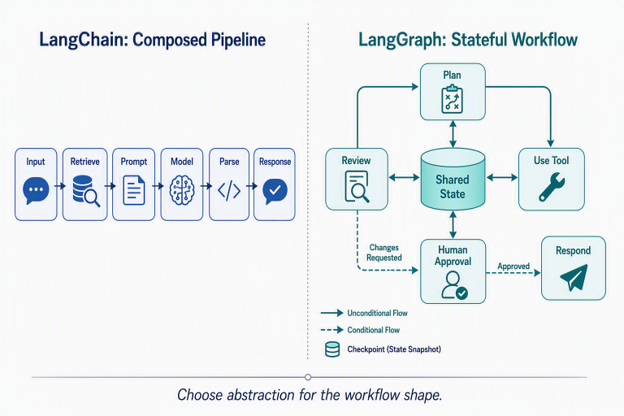
Typical pipeline: User input → prompt or retrieval step → model → output parser → application response
Core approach: composable chains and agent abstractions
LangChain is especially convenient when the main path is known in advance: one component prepares input, another calls a model or tool, and a final component transforms the result. LangChain Expression Language (LCEL) makes this composition concise with pipe syntax such as prompt | model | parser. More sophisticated agents can branch or call tools, but developers usually interact with them through a higher-level harness rather than defining every transition directly.
Where LangChain Shines
- Model Agnosticism: Swap OpenAI for Anthropic, Google Gemini, or a local Ollama model with zero changes to downstream application logic.
- RAG (Retrieval-Augmented Generation): Connecting vector databases (Pinecone, PGVector) to chunk, embed, retrieve, and synthesize context.
- Data Transformation: Extracting strict JSON schemas from unstructured text for application APIs.
What Is LangGraph?
LangGraph is a low-level orchestration framework and runtime for long-running, stateful workflows. It represents work as a graph, so execution can branch, loop, revisit earlier steps, pause for human input, and resume from persisted state. It can use LangChain models and tools, but it gives the application explicit control over workflow behavior.
Core Architecture: State Machine & Checkpointing
Instead of treating each step as an isolated call, LangGraph organizes execution around four explicit concepts:
- State: A shared, typed data structure—such as a Python TypedDict or a TypeScript schema—that carries execution context across nodes.
- Nodes: Units of work such as LLM calls, deterministic code, retrieval operations, or API calls that read from and update state.
- Edges and conditional edges: Rules that select the next node. They enable branching, retries, loops, and runtime routing.
- Persistence through checkpointers: Saved snapshots that allow a workflow to pause, resume, replay, or recover after a failure.
A Practical Decision Rule
- Start with LangChain when the sequence is mostly known, the workflow completes in one run, and a high-level agent or chain provides enough control.
- Use LangGraph directly when execution must loop, branch dynamically, coordinate multiple actors, survive interruptions, or expose state for review and approval.
- Use both when LangGraph should orchestrate the process while LangChain components handle prompts, models, retrieval, and tools inside individual nodes.
Key Differences at a Glance
The table below summarizes where the two frameworks diverge in practice.
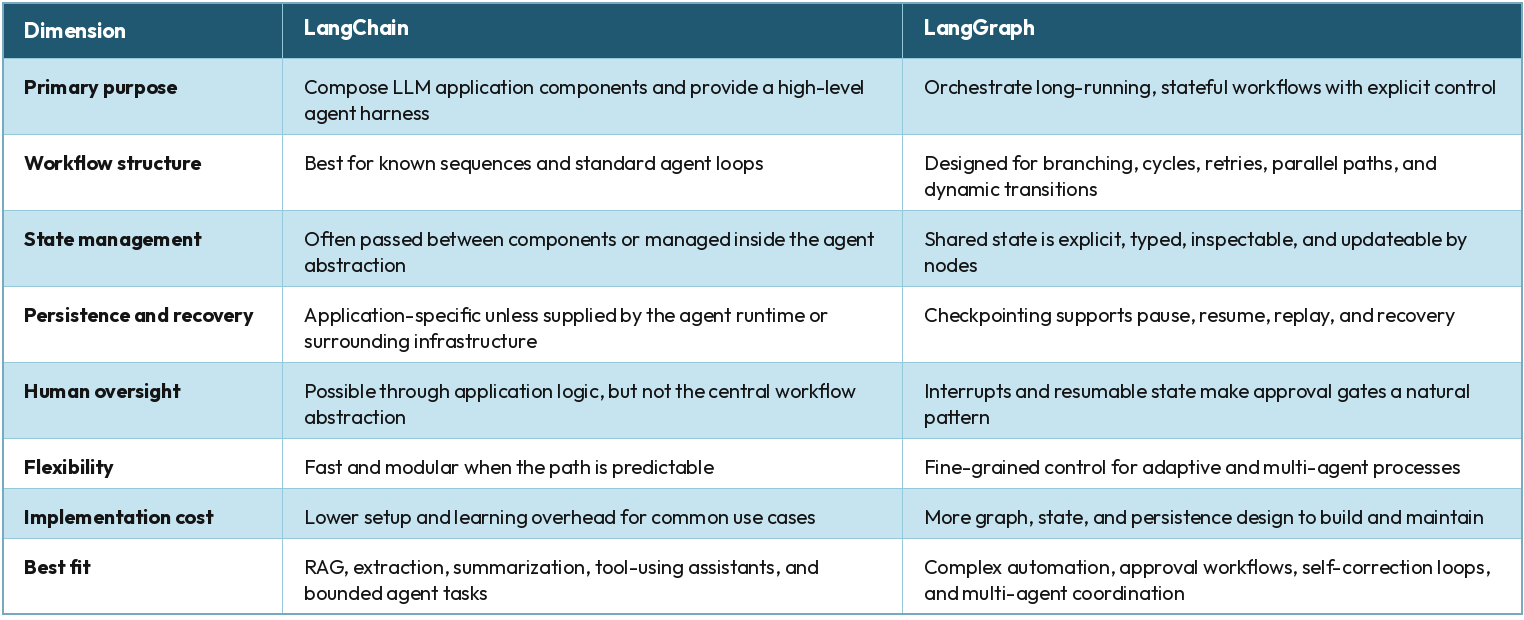
The table sets up two different questions: how you give a model tools to call, and how you control a multi-step process that a model is part of. The next section covers the specific signal that tells you when the second question matters more than the first.
The Signal It's Time to Move to LangGraph
There's a specific point where a LangChain agent stops being enough. The work stops being a single request that gets an answer. It becomes a process: something that has to remember what happened several steps back, and sometimes needs to stop and ask a person a question before it can continue correctly.
That's the shape of a system we've built internally. It takes raw requirements input, client documents, call transcripts, or plain text notes, and uses LangGraph with retrieval-augmented generation (RAG) to draft the SRS for a project. Requirements gathered this way are rarely complete on the first pass, so the workflow uses that same state to ask relevant follow-up questions and fill the gaps, then folds the answers back into the document it's building.
A single LangChain agent call would not naturally carry that context between the drafting step and the follow-up-question step. LangGraph's state object is what makes the connection possible: the same state that holds the extracted requirements is what the follow-up questions read from and write back to, run after run.
The next section covers the other half of this decision: when a task looks like this on paper but LangChain is still the right call.
When LangChain Is Still the Right Call
Most agent tasks are still a single loop: a model reads a request, calls a tool or two, and returns an answer. A support bot that looks up an order and answers a question fits this shape. A document search tool that retrieves a passage and summarizes it fits this shape too.
For tasks like these, LangChain's harness is the right level to work at. You get a model, a set of tools, a prompt, and middleware, without writing the graph, state object, and edges yourself. Adding LangGraph here means maintaining an orchestration layer that a single, non-branching loop was never going to use.
The check is simple: look at the LangChain column in the table above. If that column already describes the workflow, LangChain is the complete answer on its own. The next section walks through what that looks like for each framework in practice.
Real-World Use Cases
Use Cases for LangChain
In-App Document / Knowledge Retrieval (Standard RAG)
- Scenario: A mobile PDF reader where users tap "Summarize Page" or ask questions based on loaded context.
- Why LangChain: A single-turn query that needs parsing, embedding retrieval, and model synthesis without looping.
Form Autofill & Structured Extraction
- Scenario: A web app letting users upload invoice images/PDFs to populate checkout fields automatically.
- Why LangChain: Uses LangChain’s with_structured_output() to guarantee rigid JSON schema output matching your DB or frontend form.
Customer Support FAQ Bots
- Scenario: An app widget answering predictable, single-turn support queries using company docs.
Use Cases for LangGraph
Human-in-the-Loop Approval
- Scenario: An assistant drafts a high-impact action, pauses, and waits for an authorized reviewer.
- Why LangGraph: The workflow can checkpoint its state, interrupt execution, and resume from the same point after approval or requested changes.
Multi-Agent Coordination
- Scenario: Research, drafting, and review are handled by specialized agents.
- Why LangGraph: A supervisor or routing node can assign work based on shared state and send incomplete output back for revision.
Requirements Discovery and SRS Drafting
- Scenario: The system extracts requirements from notes and documents, drafts an SRS, asks targeted follow-up questions, and incorporates the answers.
- Why LangGraph: Persisted state connects extraction, drafting, clarification, and approval across multiple runs.
Conclusion
LangChain and LangGraph are not mutually exclusive choices. LangChain offers productive, reusable components and a convenient agent abstraction; LangGraph provides the explicit state and control flow needed when that agent becomes part of a larger process. Start at the highest level that keeps the system understandable, then move to LangGraph when branching, persistence, approvals, recovery, or multi-agent coordination become core requirements.